Downtempo Samplepack from Audentity Records is all about Ambient Loops and Rhythms. If your track needs a shimmering, floating, trancy, atmospheric or mysterious touch, be sure to check this pack out. You can use it for different kinds of genres, from lofi, ambient, trance and cinematic to trip hop, hip hop, or trap. Downtempo Samplepack includes tempo synced music, piano, pad, and bassloops, as well as evolved drumloops, drum one shots, fx, and foleyloops.
All loops have a certain processed sound which will easily fit in your music without much hassle, they have something special, which you don’t find easily in other packs. Inside you will find contemporary textures, chilling and interesting bassloops, granular processed pianos, and evocative synths
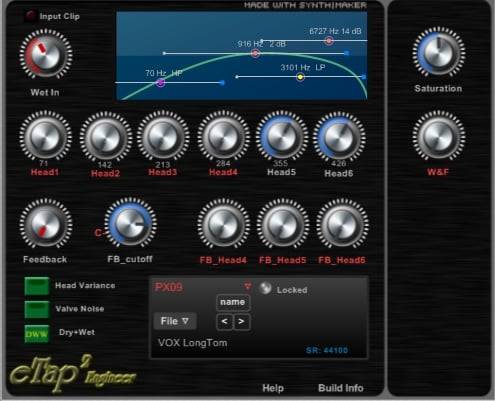
The VST module we present is a result of about 6 years experience in analyzing, developing and creating patches for various echo gear. From an engineering point of view, the objective was to emphasise on the already available vintage measurement libraries and applying the do-act-improve cycle to the design at hand as to maximise the possible performance possible.
The final approach taken is a dual approach. In many cases the guitar player is not interested in fine-tuning an echo device but would just like to select a recommended setting and play along with it. For this type of player the preset manager is loaded with a extensive set of pre-programmed patches ready to be used. In other cases where the guitar player requires matching the exact echo with the echo that was used to record the track from his/her favourite artist. The eTAP Engineer VST module is the assigned module that fits this requirement as it allows customizing the various filter and timing characteristics in minute details.
The emphasis for eTAP is geared towards the vintage echo’s used by H.B. Marvin during the 1960-1965 era. We believe “from the man himself” that the early recording are made without the Meazzi gear but with some sound-engineering tricks.
The mentioned vintage echo gear allowed the Shadows to sound like the recording while performing life. Our approach would allow also for a fine tuning towards the “studio delivered” echoes. The VST module presented here allows for those two mentioned approaches as it will act as a normal vintage device emulator or can be fine-tuned to your specific needs.
The Preset manager is pre-loaded with a complete set of JPatches to allow “playing like the Shadows”. The JPatches are based on the following vintage Meazzi echo equipment:
● Echomatic -I
● Echomatic-II
● Meazzi PA304
● VOX LongTOM
● Roland RE301
● Binson Echorec Baby
● BPM (Special mode)
Tape/Disc Artefact’s
The tape artefact’s, also part of the DESO objects can be controlled through the knobs on the right panel of the engineer module or at the top in the forthcoming eTAP Standard model. Care is to be taken not to overdo the activity.
Halo: Halo is the leakage effect of all playback heads in the Echomatic-II configuration. It is believed that it’s only around 0-1%. The range provided is extended so it can be investigated/utilized to the fullest
W&F: Wow and Flutter are artefact’s belonging to the way pulley and capstan but also other mechanical wear (like capstan dents in a rubber wheel) are affecting the tape/head interaction. Our W&F is based on a measured tape mechanism as no information is available on discs behaviour.
Saturation: Saturation is mimicking the tape’s saturation behaviour as it really compresses the signal. Our saturation fits a typical 15IPS tape.
In addition, extra 12ax7 valve characteristics are added to the audio chain including a signal/noise/distortion relationship that’s comparable with vintage echo machines.
BPM
The BPM mode (Beats per Minute) allows for a head timing mode that fits exactly the beads per minute. By using this mode the user can create an unique set of timings and the related amplifications of the heads including a wet filter characteristic to emulate other devices.
Samplestar is very proud to present Abstrakt Jazz Flavors!
From deep & pensive to emotive & uplifting, Abstrakt Jazz Flavors explores a unique soundscape of sultry jazz vibes & downtempo lounge. The production kits are the perfect starting point for creating your very own re-worked jazz hop & lofi lounge edits safe in the knowledge everything is royalty-free.
In order to create a true, authentic sound, all instruments were recorded live and performed by professional session musicians and vocalists. Dig right in and explore a wealth of inspirational writing material including the re-sampled bonus edits perfect for those looking for something a little more abstract & unique. This pack will also work great in Jazz Hop, Nu Jazz, Down-tempo, RnB, Chill Hop, and lots more genres! All content has been carefully mixed and eq’d for optimum sonic balance while allowing plenty of extra headroom for further processing and also final mastering stages.
Lo-Fi House: Sweet Sedation was created in collaboration with lo-fi hip hop artist and beatmaker, Marc AKA misc.inc. from his studio in Dresden, Germany. The pack combines soulful ambiance with organic sound design and textural explorations to weave together stories and feelings. With hints of vaporwave, techno, and deep house, these sounds are delightfully gauzy, saturated, and certainly sweet.
163 Loops
105 One Shots
Capsun ProAudio: Designed Inspiration. Led by Jay Pulman AKA Capsun, this company is made up of producers that are passionate about new music and the tools that help make that happen. Each genre is represented by a dedicated expert musician who is familiar with the most current trend. The result is an overall sample collection without weaknesses and with something for everyone.
Lo-Fi House: Sweet Sedation was created in collaboration with lo-fi hip hop artist and beatmaker, Marc AKA misc.inc. from his studio in Dresden, Germany. The pack combines soulful ambiance with organic sound design and textural explorations to weave together stories and feelings. With hints of vaporwave, techno, and deep house, these sounds are delightfully gauzy, saturated, and certainly sweet.
163 Loops
105 One Shots
Capsun ProAudio: Designed Inspiration. Led by Jay Pulman AKA Capsun, this company is made up of producers that are passionate about new music and the tools that help make that happen. Each genre is represented by a dedicated expert musician who is familiar with the most current trend. The result is an overall sample collection without weaknesses and with something for everyone.
ALERT!! WARNING! This comprehensive collection of designed and recorded alarm sounds covers all varieties of alarm: small and large, high tech, complex and simple, continuous sirens, harsh buzzers and subtle beeps.
The sounds can be used for a wide range of alert and alarm sounds, including: car alarms, smoke detectors, timers and clocks, air raid sirens, medical equipment, police and emergency sirens, fire alarms, home security devices, digital watches, gadgets and communication devices.
ALERT!! WARNING! This comprehensive collection of designed and recorded alarm sounds covers all varieties of alarm: small and large, high tech, complex and simple, continuous sirens, harsh buzzers and subtle beeps.
The sounds can be used for a wide range of alert and alarm sounds, including: car alarms, smoke detectors, timers and clocks, air raid sirens, medical equipment, police and emergency sirens, fire alarms, home security devices, digital watches, gadgets and communication devices.
84 Loops
218 Loops
A new resource for musicians, composers, filmmakers to add life to their original songs and soundtracks, Field & Foley has the creative textures you are are looking for to take your production to the next level.
Welcome to Melodic Techno Explorations. Strap yourself in, adjust your mirrors and don’t forget to hydrate. Artisan Audio launches straight in, juxtaposing the simplicity of a rolling techno bassline with complex moving melodic elements and perfectly swung percussion. Contained within these folders are a tight and precise collection of mesmerising synth work, throbbing subs and pounding drums.
Depth, warmth and organic feeling are the order of the day when it comes to the percussion and drums. Evolving drum elements, foley sounds, relentless hats and booming low kicks. This is just what you need for filling the sonic spectrum and the dance floor in one swift movement. The bass is full bodied, solid and ready to drop straight into your track. Keep it simple or chop and screw until your heart is content.
There is of course a heavy focus on melodics in the pack and you will not be disappointed with the offering. Lush chords, twinkling arps, dreamy pads and punchy stabs. Dub shots, silky strings and weaving lead loops, this has everything you need to make a super tight, melodic Techno roller.
In detail, expect to find 377 MB of content, with all Wavs recorded at 24Bit & 44.1KHZ. Loops are broken into 23 Synth Loops, 16 Full Drum Loops, 16 Top Loops, 15 Bass Loops, 12 Perc Loops, 7 Pad Loops, 6 Fx Loops and 5 Kick Loops. One shots are divided into 44 Drum Hits, 27 Bass Hits, 21 Synth Hits and 6 Fx. Also included are 53 Soft Sampler Patches (for NNXT, EXS24, Kontakt, Sfz and Halion).
Pack specs:
•377 MB
•24Bit 44.1KHZ
•23 Synth Loops
•16 Full Drum Loops
•16 Top Loops
•15 Bass Loops
•12 Perc Loops
•7 Pad Loops
•6 Fx Loops
•5 Kick Loops
•44 Drum Hits
•27 Bass Hits
•21 Synth Hits
•6 Fx
•53 Soft Sampler Patches
The Mastering Tools are part of the RTW Masterclass PlugIns, a range of products that provides RTW meters as plug-in software and stand-alone application for Windows® and Mac OS X®. By transferring the analyzer tools to a pure software that requires no additional hardware, RTW will also make them available to musicians, radio producers, and audio/video engineers who need to meet the resulting implementation specifications required by TV and radio broadcasters. As a means for quality control, the Mastering Tools with their precisely working and easy-to-read instruments ensure compliance with custom specifications. Thanks to intuitive operation, they are equally suitable for users with or without background knowledge.
Mastering Tools feature extensive analysis and display functions for mastering, metering and loudness measurements for single- up to multichannel applications including a wide range of PPM scales and displays, VU appearance and TruePPM measurements.
With this the Mastering Tools execute the functionality of comprehensive equipped TM7 and TM9 instruments including basic and Premium PPM, Loudness, RTA, SSA, Audio Vectorscope, and (Multi-) Correlator, and offers the same degree of functionality and clarity as the hardware models. The instruments can be freely arranged and scaled. Various function parameters offer extra flexibility.
Six selectable window frames (landscape and portrait view) resp. the freely adjustable display window permit the tailorable positioning of the provided instruments. Multiple instances may be used. You can store all setups and layouts as presets.
Features
DAW plug-in and stand-alone multi-channel application
Selectable window frames or freely adjustable display for tailorable positioning
Flexible display layout with scalable instruments
Sampling rates up to 96 kHz
Up to 8-ch. PPM, TruePeak, and Loudness measurement
Graphical routing overview with channel presence and activity indicator
Bargraph and/or numerical display
Loudness acc. to EBU R128 s1, ITU-R BS.1770-4/1771-1, ATSC A/85, ARIB, OP-59, AGCOM, CALM Act, Leq(), TASA,
SAWA
Loudness range (LRA) with MagicLRA
SPL view
Surround Sound Analyzer
Multi Correlator, Stereo Correlator
Audio Vectorscope
Real Time Spectrum Analyzer (RTA)
Function parameters for extra flexibility: integration time, operational range, tolerance, viewing options for metering data and scales
RTW Continuous Loudness Control v4.1.2 Standalone VST2 VST3 AAX [WIN]
Continuous Loudness Control (CLC) is a Masterclass PlugIn featuring a unique visualization and patented loudness processing algorithm as a plug-in and stand-alone software. The amazing look-ahead low latency algorithm used in the CLC allows dynamic loudness processing of unknown live audio and audio files to a given loudness value with or without changing the original Loudness Range and protects to an adjustable True Peak value. CLC further improves the quality of loudness processing with various enhancements like batch processing of audio files, extended audio format support, (e. g. MXF) an expert mode for very special material, Mmax and Smax limiting, report functions, and optimized presets for e. g. streaming audio.
CLC technology allows users to constantly adapt the level of audio they are working on, against a given program-loudness value, along with a definable loudness range in real-time with minimal obstacles. The CLC algorithm “learns” during processing about the dynamic structure and intention of the sound signal, and adopts its processing constantly to predict what comes next. CLC software is best for handling Live audio, DAW audio, and audio files.
But also broadcasters are kept in mind, as they receive many different types of audio files (e. g. MXF) and have to prepare them for transmission. Therefore, CLC‘s batch mode offers automated and unattended loudness analysis and processing of audio files. Incoming audio files from different sources are processed according to predefined settings for e. g. different genres; the output is stored in the target folder together with optional report files. Optimized presets and the Expert mode allow to better match requirements for different types of programs and distribution channels.
CLC may be operated with the most common DAW software products with Mac and PC and now also as a standalone software tool. With CLC technology, users are able to maintain accordance with EBU R128 and other global loudness standard specifications.
Features:
Live Audio, DAW Audio, and Audio File modes in multi-channel applications
Batch processing
Extended audio format support (e. g. MXF)
Loudness acc. to all global standards
Adjustable Target Loudness and Loudness Range (LRA)
Adjustable TP Limiter
Mmax and Smax limiting
Expert mode to process very special audio material
Optimized presets for e. g. streaming audio
Graphical routing overview with channel presence and activity indicator
odece loopkit vol. 1 | 7 melodies (each one as mp3 + stems)
oliver francis type beat, 28 Grams, 28 Grams Type Beat, Trapwiz, Joey Bada$$, Joey Bada$$ Type Beat, King Louie, King Louie Type Beat, Chiraq, Glo Gang, Glo Gang Type Beat, Glory Boyz, Glory Boyz Type Beat, Rick Ross, Rick Ross Type Beat, Meek Mill Type Beat, Meek Mill, Wale, Wale Type Beat, Wiz Khalifa Type Beat, Wiz Khalifa, The Game, The Game Type Beat, Vic Mensa, Joey Bada$$, Vic Mensa Type Beat, Joey Bada$$ Type Beat, Chance The Rapper, Chance The Rapper Type Beat, J Cole Type Beat, J Cole, SD, Soulja Boy, Soulja Boy Type Beat, Drillin’Shit Type Beat, O’Block, O’Block Type Beat, OTF Type Beat, Lil Durk, Lil Reese, Lil Durk Type Beat, Lil Reese Type Beat, Brick Squad, Brick Squad Type Beat, Waka Flocka Flame, Waka Flocka Flame Type Beat, Waka Flocka Flame Type Instrumental, Chief Keef, Chief Keef Type Beat, Young Chop Beats, Young Chop Beats Type Beat, Fat Trel Type Beat, Fat Trel, Tyga, Tyga Type Beat, YG, YG Type Beat, Jahlil Beats Type Beat, Jahlil Beats, Schoolboy Q, Schoolboy Q Type Beat, MacMiller, MacMiller Type Beat, Mac Miller Type Instrumental, OXOVO, OXOVO Type Beat, OXOVO Type Instrumental, Childish Gambino Type Beat, Kendrick Lamar Type Beat, Drake Type Beat, Dr Dre, Dr Dre Type Beat, Drake, Kendrick Lamar, Childish Gambino, Free Instrumentals, Mac Miller, Mac Miller Type Beat, Mac Miller Instrumental Free Instrumental, Free Beats, Free Hiphop Beats, Free, High, Skyhigh, Sigma, SigmaBeats, Sigma Beats, Trap, Trap Music, Trippy, High, Weed, Smoke, Old School, Oldschool Beats, Vibe Beat, Eazy Instrumental, Summer Beat, FL-Studio, FL-Studio 9, FL-Studio 10, FL-Studio, Sample, Samples, Producer, Simple Livin’, rich the kid, lil yachty, playboi carti, xavier wulf, shwb, free beats, bones, ethelwulf, chris travis, suicideboys, southsidesuicide, pouya, fat nick, denzel curry, xxyyxx, clams casino, sesh, xavier wulf, bones, gbc, coldhart, lil peep, denzel curry, keith ape, ult, c9, tag shai, yung lean, sadboys, nae sano, yung leandoer, yung gud, yung sherman, ecco2k, whitearmor
Welcome to the new audio production course where Dan Larsson is going to show you how to synthesize a kick drum using several different instruments. The Kick drum is the most essential part of electronic music and it doesnt matter what style you produce.
Being able to create the perfect kick for your track is a crucial skill. In this 4 video long course Dan is going utilize 3 different instruments to create a kick sound that is nice, clean, heavy, and delivers that perfect punch.
In the first video Dan will cover the basic theory behind creating specific drum sounds. Next, in video 2, he will be using XFer Serum to make a solid drum hit.
Followed by video 3, Dan will be using his “go to” synth to achieve the same goal in Abelton Operator.
And wrapping things up in video 4, Dan chooses the ultimate kick weapon, Sonic Academy Kick 2.
So if you want to boost your productivity skills and make some mind blowing kicks, then what are you waiting for? Jump on into the course.
Video 1 – Kick Theory
In the first part of this series Dan crafts the basic theory behind a good clean, hard, and punchy kick drum. And don’t worry this wont be as boring as high school history class.
Video 2 – Kick in XFer Serum
In this video Dan uses the most popular synthesizer out there to make a solid bass drum. It may not be an easy task because of the envelops in Serum, but wait until you hear the end result.
Video 3 – Kick in Ableton Operator
Ableton Operator is an awesome synth, especially when it comes to creating crazy clicky transients. That is why Dan chose to use this stellar FM Synth to crank out a very stylish kick.
Video 4 – Sonic Academy Kick 2
Are you ready? In our last segment Dan breaks out his ultimate weapon of choice, Sonic Academy Kick 2, and shows us how to make a seriously phat kick.
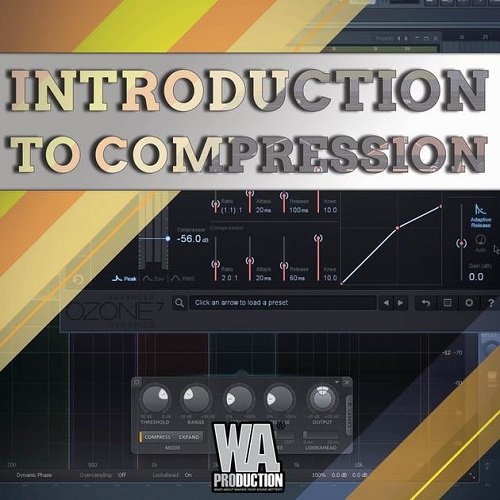
WA Production Introduction To Compression TUTORIAL
Welcome to Introduction To Compression audio course by Brandon Gono.Here is what you will learn from the included Videos:
Video 1 – What is a compressor (08:18)
A compressor is effectively a fader that you can program so that it wiggles around in real time. The beauty of it at mixdown is that you can combat undesirable signal level variations that would otherwise prevent an instrument from maintaining its position in the balance.
Video 2 – Parameters of a compressor (17:15)
Threshold: Determines the volume level at which the compressor will begin acting
Ratio: Determines the amount by which material above the threshold will be compressed.
Attack: Determines how quickly the compressor will react to sounds above the threshold.
Release: Determines how quickly the compressor will return to a normal state when sounds fall back below the threshold.
Gain: The knob that makes up with the attenuated signal.
Video 3 – Mixing with compression (20:34)
A supplementary video that shows how we can use compression to improve the mix.
Video 4 – Introduction to multiband compressors (03:05)
A multiband compressor is an elaboration on the basic concept of compression. A multiband compressor works by splitting the input signal into multiple frequency bands (usually three), sending each to a separate compressor, and then mixing the signals together again after compression.
Video 5 – Mixing with multiband compression (15:18)
Another supplementary segment that shows how multiband compressors are used on a song.
Video 6 – Introduction to Serial compression (12:08)
One variation on the standard compressor usage paradigm is to use multiple compressors on the same sound, chained one after another. This is called “serial compression,” and there are plenty of situations in which it’s a good idea. Often several compressors working as a team can get the job done better than one compressor.
Video 7 – Introduction to sidechain compression (10:43)
Some compressors offer a “sidechain” input. This is a secondary audio input that allows you to use a signal other than the input signal to control the action of the compressor. This second signal is called the “sidechain signal.”
A sidechained compressor behaves quite differently from a normal compressor. Rather than responding to peaks in the input signal, it responds to peaks in the sidechain signal. The dynamics of the sidechain signal are used to shape the dynamics of the input signal. If the sidechain signal goes over the threshold, then the input signal will be reduced accordingly.
Master, Upload, and Promoting with Bass Music Producer Dirk Green
How to take your music from the depths of your file library and finalize content, upload it, and promote it. Lather, rinse, and repeat…Forever. Join Dirk Green as we explore the best (and most affordable) ways to get your music released, and more importantly…heard.
Videos Include:
Step-by-Step Guide to Releasing Music
Screen Capture Hands-on Tutorials
Royalty Free Song/Samples to Follow Along
Course Syllabus:
1. Mastering; The Absolute Basics
a) With stock Ableton Plugins: M/S EQ, Multi-Band Compressor, Limiter
b) With Ozone 8 exclusively..
2. Planning & Uploading: Tools for becoming your own label and branding yourself on various platforms, such as…
a) Pre-Production / Planning Tips: Pre-Release / Release Day / Post-Release
b) AWAL: How to get your music heard on multiple music streaming services + Creating a legitimate release schedule.
c) PumpYourSound:
* Creating landing pages to show the various platforms your new release is featured on.
* Creating download gates to gain more followers, and direct your fanbase to other websites easily.
Songwriting in Ableton Live (or any Audio Application) TUTORIAL
Welcome to Songwriting in Ableton Live (Or Any Audio Application!)
This course is “5-Star Certified” by the International Association of Online Music Educators and Institutions (IAOMEI). This course has been independently reviewed by a panel of experts and has received a stellar 5-star rating.
In this class, we are going to write a song together. We will start with just messing around on the keyboard until we find an idea, then we will work on the song structure, form, sound design, and end with mixing it and a discussion about mastering the track. Beginning to end – step by step!
100% Answer Rate! Every single question posted to this class is answered within 24 hours by the instructor.
This class is for anyone who has an interest in songwriting. Especially:
Aspiring Songwriters: If you have never written a song before, but you want to learn how its done, this course is for you.
Songwriters: If you are a traditional songwriter, but want to expand your palette by using electronic elements, or just help recording your songs, this course is for you.
Musicians: If you have wanted to improve your compositions by understanding how the writing with audio software works, this course is for you.
Producers: Improve your tracks by gaining a deeper understanding of form, sketching, structure, and development.
In this class, we start with the very basics of songwriting and work all the way up to a finished song. I’ll walk you through every step of the process and explain the logic behind every decision I make.
The goal of this class is for you to learn how to make original, compelling, and memorable sounding music.
Software:
This course is NOT specific to any DAW program.
I’ll be using Ableton Live Suite 10 in this course as my main DAW, but if you are using any other program you will be able to follow along just fine. That includes Logic, FL Studio, Pro Tools, Reaper, Reason, Cubase, or any of the others. My method in this class is to teach concepts, so whatever I do, you will be able to do it in your own software.
Genre:
I’m best known for working with electronic music, but I’ve designed this course to be as inclusive as possible when it comes to genre. We will talk about songwriting techniques for all genres, sounds, and styles. All genres are welcome here!
Topics Covered:
The Essential Tools of Songwriting
Working with MIDI
MIDI Controllers, Keyboards, and Guitars
Overdubbing real instruments
Defining a Sound “Palette”
Building a Library of Samples
Building a Library of Synths
Building a Library of Drum Sounds and Loops
Sketching
Developing a Sketch
Expanding a Sketch
Defining Form
Lyrics
Drum Programming
Sound Design Elements
Synthesizers
Recording “real” Instruments
Mixing
Balancing
Tuning Recordings
Mastering
And much, much more!
If you are ready to start making professional sounding songs, this is the class that will start you on that journey. Get started today.
Dr. Allen is a university music professor and is a top-rated Udemy instructor – with nearly 100 courses and over 200,000 students.
In 2017 Star Tribune Business featured him as a “Mover and a Shaker,” and he is recognized by the Grammy Foundation for his music education classes.
** I guarantee that this course is the most thorough songwriting course available ANYWHERE on the market – or your money back (30-day money-back guarantee) **
Closed captions have been added to all lessons in this course.
———————————————————————
Praise for Courses by Jason Allen:
⇢ “It seems like every little detail is being covered in an extremely simple fashion. The learning process becomes relaxed and allows complex concepts to get absorbed easily. My only regret is not taking this course earlier.” – M. Shah
⇢ “Great for everyone without any knowledge so far. I bought all three parts… It’s the best investment in leveling up my skills so far..” – Z. Palce
⇢ “Excellent explanations! No more or less than what is needed.” – A. Tóth
⇢ “VERY COOL. I’ve waited for years to see a good video course, now I don’t have to wait anymore. Thank You!” – Jeffrey Koury
⇢ “I am learning LOTS! And I really like having the worksheets!” – A. Deichsel
⇢ “The basics explained very clearly – loads of really useful tips!” – J. Pook
⇢ “Jason is really quick and great with questions, always a great resource for an online class!” M. Smith
—————————————————————————-
Students who register for this course will receive ongoing exclusive content and discounts for all future classes in the series.
What you’ll learn
Students will learn how to craft songs using audio software as their main tool.
A Complete Introduction To The Art Of Creating Music For Hollywood Trailers
The course starts now and never ends! It is a completely self-paced online course – you decide when you start and when you finish.
Walid Feghali the Co-founder, is a composer, mechanical engineer, concept artist and entrepreneur from Sweden. Travelling and exploring new opportunities, always looking for new things to learn and create.
#01 – Preface
#02 – Main Trailer & TV Spots
#03 – How to Write Licensable Trailer Music
#04 – Hybrid Trailer Cue Creation Walkthroughs
#05 – Analyzing Trailer Music
#06 – Studio Equipment
#07 – Mix
#08 – The Right Publisher
#09 – The Approach




![RTW Mastering Tools v4.1.2 Standalone VST2 VST3 AAX [WIN]](http://freshstuff4you.com/wp-content/uploads/2021/01/Mastering-Tools.jpg)