Monthly Archives: September 2023

iZotope Ozone 11 Advanced v11.0.0 [WIN]

By | September 7, 2023

iZotope Ozone 11 Advanced

iZotope Ozone 11 Advanced v11.0.0 [WIN]

Craft the perfect listening experience with the ultimate collection of mastering tools. Whether you’re putting the finishing touches on the next chart-topping hit or producing your first song, Ozone 11 delivers cutting-edge processing and AI-powered workflows. Effortlessly make your tracks release-ready and unlock the full potential of your productions.

What’s new in Ozone 11?

Clarity Module [Advanced]
Pure magic
The Clarity module adaptively maximizes the spectral power of your tracks. In other words, it does the science for you, so your music sounds professional, polished, and louder without penalties. You’re going to want to use this on everything.

Stem Focused [Advanced]
Go beyond mastering
Harness the power of AI to rescue problematic mixes in ways that were previously impossible. Apply any Ozone module to an isolated stem to control the internal balance of a mixed file with mind-blowing precision. Mix revisions are a thing of the past.

Transient/Sustain [Standard and Advanced]
New dimensions
Unlock your creative potential by separately enhancing the transient and sustain. Get the most out of your masters with this innovative addition to the classic tools, or explore new sonic frontiers by leveling up the latest, cutting-edge Ozone modules.

Upward Compress [Standard and Advanced]
Level up your masters
Boost quiet sections while preserving fast transients with this novel transparent compression circuit. Increase density and detail with one intuitive slider that replaces complex parallel routing, gain-staging, and level-matching.

Assistive Vocal Balance [Elements, Standard and Advanced]
Find the sweet spot
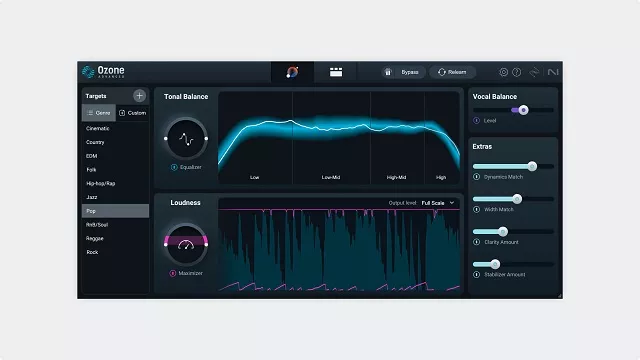
Achieve the clear, perfectly-balanced vocals that will bring out the emotion in your music. Through analyzing hundreds of top songs, our Master Assistant learned how to sit the vocals in the mix, and with our new AI Vocal Checker, you never have to worry about levels again.

Download link

Groove3 Ozone 11 Explained [TUTORIAL]

By | September 7, 2023

Groove3 Ozone 11 Explained [TUTORIAL]

Groove3 Ozone 11 Explained [TUTORIAL]

If you’re into mixing or mastering your own music, you know that iZotope’s Ozone is one of the most full-featured tools around. In this Ozone 11 video course, Production expert Eli Krantzberg will take you through Ozone 11 in full detail, leaving no stone unturned and providing plenty of musical demonstrations so you can see and hear it in action. You’ll learn how to make the most of the various modules (Dynamics, Maximizer, Impact, Clarity, etc.) and explore all the parameters in the process, leaving you will a complete working knowledge of the software and the confidence to use it effectively on your own productions. These videos are for new Ozone 11 users.

Eli kicks off the course with an informative overview of “the mothership,” its capabilities, primary uses, and more. This suite covers an expansive range of applications, so it’s helpful up front to know the scope of Ozone 11 up front. Then he moves on to the subject of global metering so you’ll have a thorough understanding of what you’re seeing and how to interpret it, along with some other functions such as the undo history, the channel processing modes, and more. You’ll learn about the Equalizer module after that, including the new transient/sustain channel mode and delta function.

Next up is the Dynamics module, where you’ll discover all you need to know about single- or multi-band compression or limiting. Following that, Eli demonstrates the Dynamic EQ feature, which combines traditional EQ with compressor-style threshold-based detection, turning your static EQ into an active one that only boosts or cuts when needed. The newly revamped Maximizer module is covered next, which now includes upward compression, enabling quieter material to be boosted while also reducing peaks.

There’s a bunch more to come throughout the remainder of the course, including Clarity and Low-End Focus (smart processes for removing muddiness and more), Impact (control of micro dynamics), Stabilizer (tonal balancing and taming resonance), Imager (adjusting stereo width and more), Master Rebalance (intelligently adjusting individual elements in a finished mix), Master Assistant (AI technology that analyzes your mix and builds a custom processing chain), and much more!

With everything Ozone 11 can do, it’s easy to miss a lot of its incredible features. After watching this Ozone 11 course, you can be confident that you’ll be using the suite to its fullest potential and treating your music with the care and attention it deserves. See the individual Ozone 11 video tutorial descriptions for more information and to see a more comprehensive list of everything it can do. Transforming your mixes for the better has never been easier … watch “Ozone 11 Explained®” today!

What You Will Learn:

  • Using the various modules to improve clarity, tame harshness, add punch, and reduce muddiness or unwanted resonances quickly and easily
  • Understanding the various metering and gain matching options so you’ll know how to interpret what you’re seeing
  • How to add additional flavor to your track by way of vintage hardware emulations (Vintage Tape, Vintage Compressor, Vintage Limiter, etc.)
  • Using Master Assistant to quickly create a customized processing chain based on the analysis of your track and genre-specific targets
  • And much more!

Download link

PML Complete Melodic House Start to Finish Academy [TUTORIAL]

By | September 7, 2023

PML Complete Melodic House Start to Finish Academy [TUTORIAL]

PML Complete Melodic House Start to Finish Academy [TUTORIAL]

This is the most complete program for Melodic House on PML – seriously. Roadmap from an empty Ableton project to the do’s and don’ts of applying to Melodic House labels like Anjunadeep or Sekora.

A Complete Academy Program for Melodic House
All brand new content
About This Program

What You Are Getting

  •  9 Online Courses
  •  10+ Fully Produced Ableton Project Files
  •  1 Full size MH Sample Pack with 400 + Samples and Loops
  •  90+ Diva Presets
  •  170 + Midi files
  •  6 Problem Solver Packs Sample Packs
  •  Organica Essentials (50 Top Loops)
  •  Acoustic Melodic House Themes (60 Loops)
  •  Kick Drums for Melodic House (60 Samples)
  •  Hats and Tops (50 Samples)
  •  Hats and Tops (50 Samples)
  •  Melodic House Drums (150+ Samples)
  •  Vocal Drones & Atmospheres (40+ Samples)

Download link

Black Salt Audio Silencer v1.0.1 [WIN]

By | September 7, 2023

Black Salt Audio Silencer

Black Salt Audio Silencer v1.0.1 [WIN]

Change The Way You Mix Drums
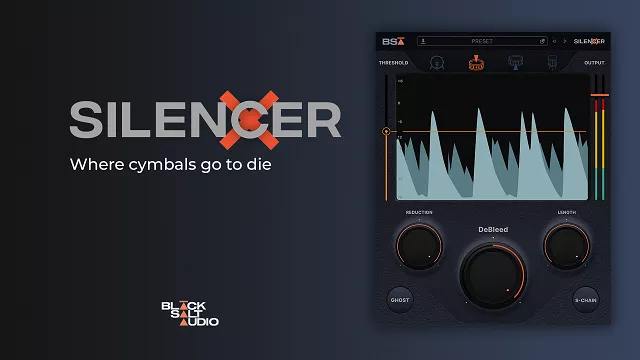
Cymbal bleed is the enemy of great drum mixes. Traditional gates can only help so much before the gating itself becomes obvious. Silencer is the ultimate solution, eliminating cymbal bleed while preserving the integrity of your original sound. It’s not just a gate… it will forever change the way you mix drums.

Features:

More Than Just A Gate
Unlike a traditional gate that simply reduces volume, Silencer incorporates a transparent & musical sounding gate with an advanced de-bleeding circuit. This allows you to kill all of the nasty high- frequency bleed while preserving the attack, tone and body of the original sound.

Get 2X More From Your Drums
For decades, mixers have had to rely on samples and compromise their live drum mixes because of bleed. With Silencer, all that nasty bleed will disappear – so go ahead and crank that EQ, saturation and compression twice as much as before. It’s so good that your live drum tracks will sound as clean as drum samples.

Intuitive Controls Extreme Precision
With dedicated processing for Snare Top, Snare Bottom, Kick and Toms, Silencer intelligently filters out other parts of the kit to avoid mis-triggers. Its true lookahead means the transients you want always get through undamaged. The visualizer and simplified interface allow you to dial in your de-bleeded drum track in
seconds.

Download link

Mixland SUBLOOM v1.0.3 [WIN & MacOS]

By | September 7, 2023

Mixland SUBLOOM

Mixland SUBLOOM v1.0.3 [WIN & MacOS]

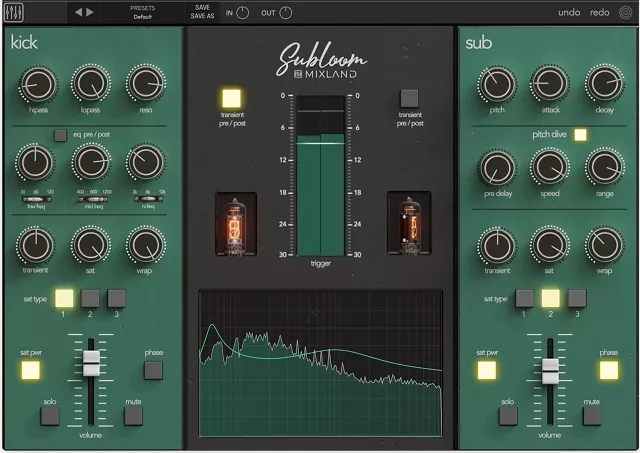
SUBLOOM is a new drum mixing console that features a comprehensive set of tools for shaping drums, including EQ, transient control, saturation, and an extremely flexible sub synthesis channel with innovative new “Pitch Dive” feature that emulates the natural resonant behavior of live drum heads.

In addition to its comprehensive feature set, SUBLOOM is also designed to be easy to use: Dial in the “raw” drum on the left side, then dial in the desired “sub” on the right side, finally blend them in together using the two channel volume faders! Subloom features a clear and intuitive interface, and the presets make it easy to get started.

Features:

✓ 2 channel console for mixing both your source drum and a triggered sine wave together for a massive sound
✓ “Pitch Dive” section that allows users to emulate the natural resonance of live drums.
Adjustable Speed, range, and decay for crafting the perfect low end bloom
✓ Comprehensive EQ
HPF & LPF with resonant control for fine-tuning low end “notes”
Aggressive British style 3-band EQ
Low (30hz, 60hz, 120hz)
Mid (400hz, 800hz, 1200hz)
High (3khz, 6khz, 12khz)
Pre/Post EQ Option for placing EQ first or last in the circuit (before or after transient design and saturation)
✓ Meticulously-tweaked Transient Designer
Pre/Post switch to place before or after saturation
✓ Gorgeous Saturation Circuit
3 Modes that range from subtle warmth to tube obliteration
“Warp” feature that modifies the entanglement between the eq and saturation circuits
✓ Easy to use (even for beginners!)
Clear and intuitive interface and a variety of presets to get you started.
✓ High-quality sound: SUBLOOM delivers high-quality sound that will make your drums sound their best.
✓ Available in AAX, VST3, and AU formats
macOS M1 & M2 Native (Mac OS X 10.7 and higher)
Windows 64bit (Windows 7 and higher)

Download link

Patchmaker Sematary for Serum [FXP]

By | September 7, 2023

Patchmaker Sematary for Serum [FXP]

Patchmaker Sematary for Serum [FXP]

Patchmaker is proud to present “Sematary for Serum” – an essential pack of expertly crafted Witch House/Hip Hop sounds that can be used to bring atmosphere, energy and depth to any track.

This collection offers 74 Serum presets, that will help you to build up your own unique music with some dark and creepy sounds.

Inside you will find aggressive reese basses, epic pads, huge crisp leads, organic keys and everything you may need to create a great track to push up your producer skills.

Every preset has all macros, so you will be able to tweak them at your own preference and get even better results.

Check out the demo for a feel of the quality of these presets and get your copy today!

NOTE: The preview contains drums for illustrative purposes only.

Pack Contents:

  • 19 Bass
  • 10 Synths
  • 7 Keys
  • 7 Pads
  • 14 Leads
  • 9 Seqs
  • 1 Bells
  • 4 SFX
  • 3 Wobbles

Download link

Demo Preview:

Zenhiser Glitch Hop Junkie WAV

By | September 7, 2023

Zenhiser Glitch Hop Junkie WAV

Zenhiser Glitch Hop Junkie WAV

Prepare to delve into the twisted world of Glitch Hop, venture through the absolute unknown and re-emerge with an enormous collection of Glitch Hop hooks from the unadulterated funk to the Glitch slap madness that is ‘Glitch Hop Junkie’. We’ve absolutely crammed this pack with everything you need to glitch up your studio, funky ass basslines, choppy beats, tight snappy drum sounds, glitch manic fx and full on riser fx. Sounds great right, well it get’s even better, 70 Glitchtastic bassline and synth presets are also included in the pack, ready to deliver Glitch Hop preset awesomeness. Now Glitch Hop Junkie becomes a series player for all you Glitch Hop, Glitch Step and Breaks producers.

The sound sculptures of this sample pack is second to none and with striking presets to boot Glitch Hop Junkie becomes one of the most dynamic and user friendly packs Zenhiser has ever created.

Not only does Glitch Hop Junkie deliver such a broad range of samples, presets and loops but we have taken the pleasure of splitting each section into 3 different bpm’ s, 85bpm, 87bpm & 100bpm which means whichever speed you create there is something sonically perfect waiting for you!

SAMPLE PACK SPECIFICATIONS:

  • Glitch Hop Basslines – 30
  • Glitch Hop Beats – 99
  • Glitch Hop Drum Sounds – 51
  • Glitch Hop FX & FX Loops – 30
  • Glitch Hop Riser FX – 20

Files – Audio: 250
Type – Audio: 24-Bit 44.1-Khz
Info – Key: Yes
Info – Bpm: Yes

Download link

Demo Preview:

BSIDES Intimate WAV

By | September 7, 2023

BSIDES Intimate WAV

BSIDES Intimate WAV

This Kit includes 10 Original Sample Starters that include Live Guitars and Pianos. They were recorded in an airy environment to give them an additional “intimate” feel.

All Loops are labeled with Key & Bpm and stemmed out to provide a fast and satisfying workflow.

enjoy!

Download link

Demo Preview:

iZotope Nectar Advanced v4.0.0 [WIN]

By | September 7, 2023

iZotope Nectar Advanced

iZotope Nectar Advanced v4.0.0 [WIN]

Effortless professional vocals
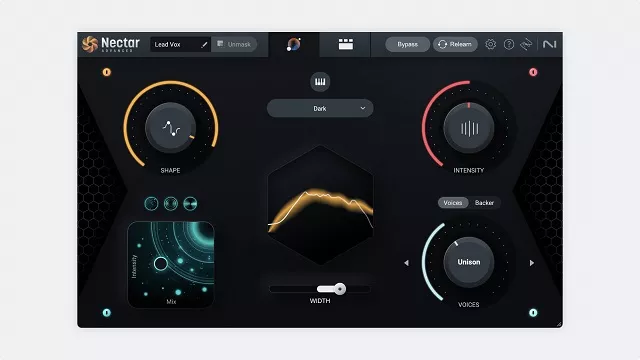
Nectar 4 boasts a complete set of tools for mixing, producing, and designing vocals. Explore new modules like Auto-Level for consistency, Voices for vocal layering, Backer for background singers, and Vocal Assistant for easy and powerful processing. Unleash a suite of powerful plugins for complete control over your vocal sound.

What’s new in Nectar 4?
Audiolens referencing [Elements, Standard, Advanced]
Reference any voice
Audiolens is compatible with Nectar 4, allowing you to tone-match any vocal sound. Separate the vocal from your reference track and gain valuable information to create a starting point for your mix.

Voices module [Standard, Advanced]
In sweet harmony
Instant, easy vocal layers: the Voices module gives you the ability to create complicated layers for your vocal production without needing to learn voice-leading and harmonic motion. Find a preset similar to your desired sound, then tweak it to your liking.

Auto Level module [Advanced]
Instantly consistent vocals
ALM (Auto Level module) is an intelligent and transparent alternative to compressors. Placed at the start of your signal chain, it acts like a recording engineer, effortlessly managing vocal levels. ALM provides consistent volume levels without introducing unwanted artifacts like traditional compressors, giving you a clean and natural sound.

Backer module [Standard, Advanced]
Who’s backing you today?
With the Backer module, you can now create background singers that sit behind your main vocal. Pick from eight different styles or import your own acapella to further customize your sound. Finish up a demo with different flavors of vocalists, creatively destroy ad-lib tracks, or create something new altogether.

13 component plugins [Advanced]
Build your own chain
Nectar Advanced comes with a powerful suite of brand-new plugins. Integrate the power of Nectar into your DAW template and build your own custom chains for every vocal in your production.

Vocal Assistant page
Help is here
Vocal Assistant now provides a broad interface for making simple and helpful decisions for your vocal production without getting lost in the details of vocal mixing.

Download link