Dive into the “maak – Berserk” Sample Pack, an expertly crafted collection of 191 kit loops and 13 sound sets, designed to push the boundaries of music production. This pack, available on Splice, is a technical marvel for producers, offering a diverse range of high-quality sounds that are ready to be the backbone of your next project.
Embrace the darkness and intensity of “maak – Berserk,” where the haunting vibes of New Jazz, the raw power of Super Trap, and the rhythmic pulse of Brazilian Phonk converge. Inspired by the gripping world of the ‘Berserk’ manga and anime, this sample pack is perfect for artists channeling the unapologetic energy of City Morgue, SosMula, Zillakami, Yeat, and Destroy Lonely, and producers seeking the cutting-edge sound of Amir Prod, BNYX, and Synthetic. Elevate your music with the unparalleled depth and grit of “maak – Berserk,” and carve a niche in the competitive landscape of music production.
George Massenburg is synonymous with excellence in the audio world, and in recent years, following the fame of their hardware, George Massenburg has funded “Massenburg Design Works” (MDW), with which he has realized two ground-breaking plugins whose features and quality are as outstanding as the analog hardware on which they’re based. In this MDW video course, production wizard Alberto Rizzo Schettino takes you on a deep dive into MDW’s two flagship plugins: the DRC2 compressor and the EQ6 parametric EQ. These MDW videos are designed for new Massenburg DesignWorks users.
Alberto begins with a quick overview of MDW and its plugin collection, including a bit of background on the man himself, George Massenburg. Then it’s on to the EQ6, an extremely powerful and incredibly musical-sounding parametric EQ that’s modeled after the legendary GML 8200 hardware parametric EQ. Usable on literally any audio signal, from recording to mixing and mastering, you’ll learn all the parameters and hear Alberto use it on strings, percussion, and more.
After that, it’s time to explore the DRC2, an unbelievably transparent compressor based on the GML 8900 hardware unit that will make you rethink what’s possible with a compressor. Alberto will break down all the controls and parameters so that you understand exactly how to get the sounds you want quickly and easily. Then follow along as he demonstrates the DRC2 in use on numerous sources, including piano, synths, percussion, and more.
These incredible plugins from MDW can truly reshape your perception of audio processing, and with this Massenburg DesignWorks Plugins video course, you’ll learn exactly how to get the most out of them quickly and easily. By the time you’re done with the course, you’ll be ready to start employing both plugins in your very next production like a pro, and your mixes will thank you for it!
See the individual Massenburg DesignWorks Plugins video tutorial descriptions for more information on what these amazing tools can do for you. It’s time to rethink EQ and compression… Watch “Massenburg DesignWorks Plugins Explained®” now!
What You Will Learn:
Basic interface layout and functionality for both plugins
How to make use of the EQ6 parametric EQ on virtually any source – from tracking and mixing to mastering and more – to enhance/repair/sweeten your tracks like never before
Using the DRC2 Dynamic Range Controller to set your tracks apart with its uncommonly musical attack and transparency
Join synthesizer guru Tyler Coffin for an in-depth look at Pigments 5, the latest version of Arturia’s own virtual synthesizer that packs a serious punch. You’ll get the lay of the land, including the numerous synth engines (Wavetable, Analog, Sample, Harmonic, etc.) and their parameters, along with a deep look into the usual suspects (filter, sequencer, effects, etc.), complete with numerous audio demonstrations throughout. By the end of this Pigments 5 tutorial, you’ll be ready to start using Pigments 5 in your very next track. These Pigments 5 videos are for new Pigments 5 users.
Tyler begins with a brief introduction to Pigments in general, discussing its basic architecture and providing a bit of background before giving a quick tour of the interface and demonstrating some fundamental characteristics of the instrument. Then you’ll learn about Play View, which provides a streamlined, uncluttered look designed for quick performances with only surface-level editing.
Next, explore the various synthesis engines available, each of which provides a different set of parameters for near-limitless sound creation possibilities. Whereas the Analog engine emulates a standard three-oscillator approach, the Wavetable and Harmonic engines provide completely different tools for sonic exploration. The Sample engine brings recorded samples into the fray, and the Utility engine adds another set of tools for experimentation, such as a noise generator, an audio input (for processing external sounds), and more.
Over the rest of the course, you’ll learn about the remaining components of Pigments 5, including the filters, modulation possibilities (MIDI, envelopes, LFOs, etc.), Sequencer/Arpeggiator, effects, the preset browser, and more! To close out the course, Tyler takes you through the process of building three different archetypal sounds from scratch: Bass, Lead, and Pad.
If you’re looking to make Pigments 5 a central player in your studio, you need to watch this course! There’s no easier, quicker way to become fluent with all of its sections and parameters, not to mention have fun in the process. Check out the individual Pigments 5 video tutorial descriptions for more information and ideas about how you can integrate it into your workflow. A brave new world of synthesis awaits…Watch “Pigments 5 Explained®” today!
Slow your heart down, breathe deep and return to a blissful world where Downtempo, Lofi and; Chillhop combine. ‘Golden’ is a smorgasbord of relaxed auditory delight.
Organic, atmospheric, melancholic, soulful and crunchy. That’s what you get with Golden. 3GB of delectable content ranging from Emancipator style instrument loops to Ta-Ku beats, and everything in between. Basslines, beats, fx, music loops, synth loops, one shots, midi and more make up an A+ sample pack that would take pride of place in any recording studio that produces music geared towards the slower pace of life.
A bundle of cool techniques were used to create this pack. Firstly a bunch of field recordings were taken to give new life and organic foundations. Then the sounds were run through an array of cool tech including old tape delays and spring reverbs like Dynacord Echocord Super 62, Roland Space Echo, Watkins Copicat, Vermont Retroverb. Tasty synths took MainStage and include Prophet, Moog, ARP and Kong. A bunch of pedals add a touch more flair and the icing on the cake is the outboard FX giving that classic polish. These include Neve, SSL and Pultec. Sounds like a dream studio set up, right!?! Well all that recording wizardry shines through in every one of the 981 samples and loops tucked away in this exemplary pack.
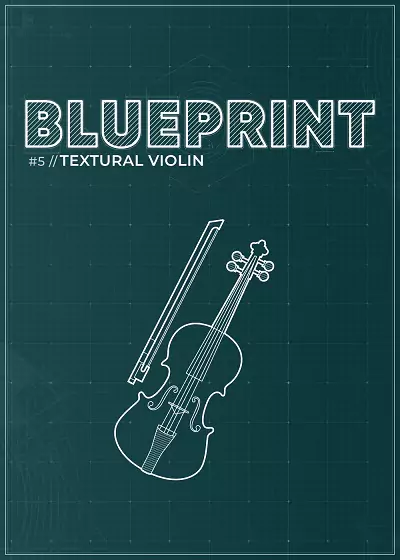
The fifth instalment of our Blueprint series showcases the early experiments performed by composer and violinist Alexander Parsons ahead of the recording sessions for our collaborative library, Trails: Evocative Soundscapes. The library showcases four articulations and a bespoke Atmosphere Layer that gives a small flavour of what’s possible with the full Trails library.
Textural Violin showcases early recordings made by Alexander Parsons as test samples before the recording sessions for our collaborative library, Trails: Evocative Soundscapes. There are four textural articulations alongside effects such as Delay and Reverbs which can be found in the full Trails library, allowing users to get a flavour of what Trails is about.
Dynamics
Control the dynamic layers via the mod wheel/ CC1
Scatter
Randomise the pan of each sample.
Delay
Controls the level of the wet delay signal.
Reverb
Control the level of reverb with further settings if you click on the cog.
Atmosphere
Control the level of the Atmosphere Layer and press [S] to solo it
Individual Articulation Settings
Click the cog on each articulation to change the Volume, Pan, Attack and Release envelopes.
Shift⇧ + Click on multiple articulations to have them play back at the same time.
Reverb
Control the level of reverb with further settings if you click on the cog.
Settings
Click the cog for additional Tightness and Dynamic Settings.
NKS SUPPORT AND KONTAKT PLAYER COMPATIBILITY
We are delighted to offer full NKS support for Blueprint: Textural Violin. Harnessing the power of Native Instruments’ Komplete Kontrol keyboards, you have full hands-on control of the instrument, using the built-in display and parameter controls on the keyboard. This also means that Blueprint: Textural Violin is accessible to blind and visually impared musicians. Furthermore, Blueprint: Textural Violin is compatible with the free Kontakt Player, with activation through Native Access, meaning you can use the library without purchasing any additional software. You can download Kontakt Player from the Native Instruments website.
FEATURES:
4 textural violin articulations played by Alexander Parsons
Individual articulation settings
Bespoke Atmosphere Layer sound design
Simple and user-friendly interface.
Full NKS support – works with Komplete Kontrol hardware.
SUITABLE ACROSS GENRES LIKE POP, EDM, TECH HOUSE, TRANCE, HARDSTYLE, HIP-HOP, R&B AND MANY OTHERS
ABOUT THE PACK:
Premium Vocals is a dynamic collection featuring hooks, backing vocals, chops, adlibs, and ambiences. Elevate your tracks across genres like Pop, EDM, Tech House, Trance, Hardstyle, Hip-Hop, and R&B with authentic human essence.
Crafted in collaboration with skilled female vocalists, each element has been carefully captured and refined by our production experts.
Explore fresh studio acapellas and adlibs, meticulously categorized by both bpm and keys. Use them as a creative resource for chopping, resampling, or drop them right into your mix. All elements are original and Royalty Free.
Plus, enjoy bonus stems from 3 demos, igniting your creativity instantly.
‘Tane’ Bergman emerges from the studio kitchen with a new recipe in hand: ‘Deep Fried Breaks Vol.1’ – Your secret ingredient for cooking up the grimiest, filthiest, and rawest underground hip-hop beats.
Sample Pack Features:
101 Thick Drum Breaks: These royalty free hard hitting drum breaks were crafted to get the classic old school sounds and grit that defined the golden era of Hip Hop
100 Drum One Shots: The perfect toolkit for beatmakers to add some slap to your beats
100 FX and Melodic One shots: Add some extra spice to your beats with synth effect and spacey textures, nasty bass sounds, dark piano melodies and grimy fuzzy guitar tones
4 Exclusive Compositions: Tane is coming in hot with a special delivery of 4 sizzling compositions that will turn your production game up to scorching levels
Ready-to-Use: All samples are delivered in 16-bit WAV file format and are BPM-labeled for smooth and easy integration into your production workflow
Panning is one of the most basic mixing tools we have, and it’s included in every DAW. So why a Pan Knob plugin? Simple answer: because it sounds way better, especially in headphones. Longer answer: Keep reading.
Why Change a Bread and Butter Effect?
Traditional panning works by adjusting the volume on your right and left channels to move where it sounds in the stereo field. Simple enough. But there’s a major problem with this: It sounds really sucky on headphones when you pan things wide. Why? Because in the real world, sound never shows up in just one ear, unless it’s a mosquito.
Pan Knob fixes this by adding a couple extra dimensions to your pan control.
It keeps low frequencies unpanned. This simulates the natural effect of your head filtering the high frequencies while letting low frequencies hit both ears.
It adds a small delay to simulate the wave front hitting your ears at different times.
Both of these effects can be toggled on and off depending on your situation. Pan knob will do everything from traditional dumb panning to advanced natural sounding panning.
Break the Rules
Because Pan Knob lets you pan anywhere and still sound natural, you are now free to break the traditional rules of panning. You want to pan your bass to the left? Go for it. It will sound natural. You want that snare drum to come from the right without giving the listener a migraine? Have at it. The traditional panning rules no longer apply.
Just the Facts
Superior panning algorithm for all listening formats
Centers low frequencies to maintain left/right balance regardless of higher frequency positioning
Selectable micro delay
Improves mix translation
Selectable pan laws
Switch between balance and pan
Pan anywhere in your signal chain
Pan Knob to the Rescue
Pan Knob enables you to instantly swap pan positions of instruments, choose between Balance or Pan for stereo tracks, and select pan laws. Best of all, Pan Knob lets you depart from standard panning schemes while still sounding natural, and doesn’t cause the balance problems common to ear-bud and headphone listening. Pan Knob enables you to experiment with panning without all the tail-chasing and tradeoffs that come with moving instruments and vocals around the stereo field using traditional panners. As an added benefit, Pan Knob speeds up your workflow, which is essential for both professional and aspiring mix engineers.
Dive into a world where sound and sensation merge, where melodies paint vibrant hues and rhythms pulse in technicolor. Unleash your creativity with our mesmerizing sample pack “Synaesthesia”, brought to you by Producer Loops. Immerse yourself in the genre-bending realm of Electronica and explore five meticulously crafted construction kits that will transport your music to uncharted dimensions.
Unearth a treasure trove of meticulously engineered sounds, designed to spark your musical ingenuity. Each kit comes fully loaded with all the elements you need – from rich melodic loops and hypnotic basslines to intricate percussion and atmospheric textures. “Synaesthesia” transcends boundaries, blending Ambient, Downtempo, and Experimental Electronica into a sonic masterpiece. Feel the pulsating energy, experience the introspective tranquility, and let your creativity flourish with sounds that know no limits.
Compatibility
To guarantee maximum flexibility, we’ve offered this pack in multiple formats including WAV, ABLETON, APPLE LOOPS, MIDI, REX2 and REASON REFILLS, allowing seamless integration.
MIDI Files Included
This pack, like so many other Producer Loops products, includes MIDI files for the majority of musical phrases heard in each Kit, allowing you to seamlessly mix your favourite synths and samplers with the sounds contained in the pack.
One-Shot Samples
Inside you’ll find one-shot drum samples, allowing you to create new beats, fills and loops to compliment the existing material. Simply load them up into your sampler of choice and create an infinite number of new beats and phrases.
Dry/Wet Loops
For users looking to simply drag and drop, the ‘wet’ files contain all of the effects processing heard in the audio demos. But for producers looking to create their own effects mix, ‘dry’ loops are also included where possible. Don’t like the wet loops? No problem; add your own effects.
Royalty-Free
All of the loops in this product are 100% Royalty-Free, so once purchased, you can use these loops in your commercial releases without having to pay any hidden costs.
Hard Techno meets fast Trancy Synth lines and raw analog distorted sounds, Atmos and agressive vocals inspired by early DJ Rush, Speedy J and Chris Liebing productions as well as more modern Dax J, I Hate Models, Hector Oaks and Shlomo releases and of course Berghain and Bassiani Club. In this sample pack, which can be used in all DAWs like Ableton, FL Studio, Logic Pro or Cubase, you can find beat elements like hihat loops, snare loops, kick loops but also full drum patterns, atmospheres, vocals and effects. The oneshot samples can also be imported in hardware sampler like Akai MPC, Toraiz SP-16 or Elektron analog Rytm. The team behind Riemann Kollektion provides you with more than 15 years of experience in Techno production. All sounds are made for maximum impact on large horn soundsystems like Funktion One, Lambda Labs or VOID.
Riemann Kollektion is a Berlin based Loops & Samples label focussed on underground Techno. Our strength are the established producers who are involved, they all have remarkable careers in the scene with releases on well known and credible labels and the use of heavy analog gear which can be seen on Riemann’s social media.
Textural cinematic piano with a soft touch through a phenomenal reverb
A 1930 Bechstein grand piano, with a complex architected cinematic sound. Recorded with help from a H8000, two tapemachines and a stereo LA2A.
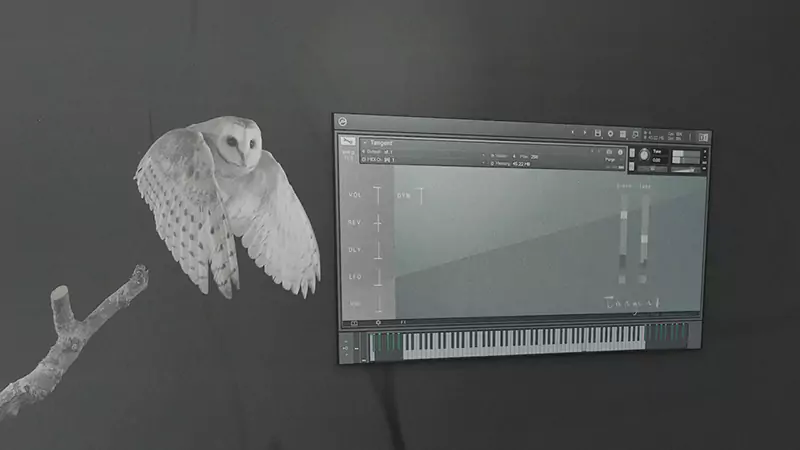
If you’re not seeking realistic piano sounds and prefer a more textural or mysterious quality, then Wrongtools’ free offering, Tangent, will certainly pique your interest. Those who appreciate timeless, ‘cinematic’ piano tones will discover a lot to love in this complimentary instrument.
Our favorite reverbs enhance this piano, making it ideal for crafting ambient compositions and adding cinematic depth.
The standout characteristic of this instrument lies in its atmospheric sphere, which can be seamlessly mixed with the primary piano sound to imbue it with a distinctive timbre. You have the option to keep it subtle for a nuanced effect or let Tangent take center stage, delivering an emotive touch to your melody.
With the inclusion of built-in sound sculpturing, pitch vibrato or LFOs etc, you can introduce warped and ethereal pitch modulation, infusing your entire sound with an organic sense of intrigue.
At a Glance:
textural cinematic piano
unlimited sound sculptering tweakabilities
recorded through our favourite reverb and two tape echo machines
piano soundscapes for impressive landscapes
simulated round-robins
included built-in impulse-responses
envelope Control
velocity curves
randomize functions
requires the “FULL” version of Kontakt
INSTRUMENTS : A Quieter Grandiose Piano – Soft ethereal majestic trailer piano
REQUIREMENTS : Full Retail Version of Kontakt 6.4.2 [or later] Required
Let us set the mood with a sublime collection of thought provoking jazz hop production kits, perfect for capturing a moment in time. From sultry to reflective – Moodz opens up your productions to new horizons.
Take a journey through soft delicate jazz infused piano motifs and lush cello harmonies, all beautifully played by stellar classically trained musicians & perfectly complimented with fresh contemporary hip hop beats.
This pack will also work flawlessly in many other genres from warm jazz infused lofi tracks to timeless down-tempo lounge edits.
Everything is 100% royalty free, cleared & release ready – Get Inspired | Get Creative.
All content has been carefully mixed and eq’d for optimum sonic balance while allowing plenty of extra headroom for further processing and also final mastering stages.
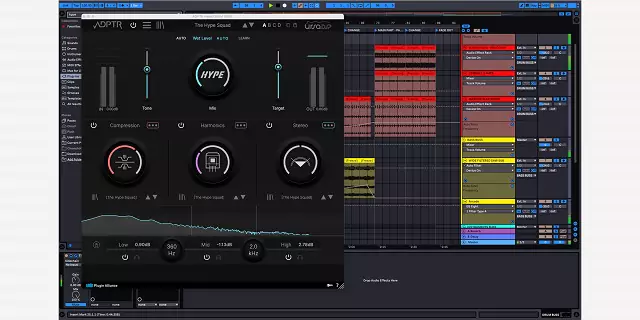
HYPE embodies high-end mixing hardware, offering dynamic processing tools for compression, harmonics, and stereo width adjustment. It transcends analog limits with over-the-top compression and groundbreaking harmonic overtones.
Three mixing plugins in one elegant workflow
Whether you’re thickening drum loops, enhancing vocal tracks, or mastering your final mix, HYPE’s simple three-section design puts a huge collection of powerful tools for mixing and audio enhancement in one simple-to-use plugin.
Multi-band harmonics with no limits
Easily combine multiple harmonic generators and compression algorithms in HYPE to drive, saturate, or enhance signals. Apply distinct harmonic modes across three bands, offering a broad range from smooth and creamy to dirty and distorted.
A revolutionary approach to harmonic overtones
HYPE delivers a full spectrum of harmonic overtones without overprocessing or distortion, thanks to its advanced ADAA algorithms and UrsaDSP’s Trajectory technology. This ensures consistent harmonics with minimal inharmonic content, letting you hit the harmonic sweet spot at any gain level.
Multi-band compression with new capabilities
HYPE provides a wide range of compression algorithms for all styles, from subtle to extreme. It features detailed controls for transient, mix, and body, allowing for tailored dynamic shaping across low, mid, and high frequencies.
Six compressor modes
From the extreme Slam to the classic Opto, and the pristine Brick, to the precise Transient, the six compressor modes range from radical to subtle. Combo merges three modes for a unique blend, while Gentle offers elegant, minor adjustments ideal for mastering, providing versatile dynamics control.
Stereo mid/side – it goes where you tell it to
Control mid/side settings across all three bands and independently adjust dry/wet signals. Enhance stereo image and depth, soften midrange frequencies with tone control, and fine-tune sound character for basses, vocals, and beyond.
Improve your mixing choices
Auto Level is integral to HYPE, ensuring changes and enhancements to your mix are unbiased by loudness, enabling improved mixing decisions.
FEATURES:
A feature-rich set of tools for compression, harmonics, and stereo width controls in one plugin
Auto Level feature that underpins HYPE’s functionality, maintaining consistent perceived loudness across the mix.
Six compression modes
Six harmonic modes
Preset library
HYPE knob for controlling parallel processing
Multi-band crossover for redefining crossover frequencies with intuitive controls, adjusting the balance across bands for targeted processing
A/B/C/D comparison functions for loading alternative presets into slots for direct comparison, enhancing the decision-making process in sound selection
Linear filters for maintaining absolute phase relationships, perfect for parallel processing, bus processing, and delivering superior sound quality
Stereo module for harnessing mid-side processing on the dry and wet signals to optimize stereo image and depth
Detailed level management establishes the maximum level for upward compression, complete with input and output gain controls and visual metering for peak and RMS levels
Samplestar are very proud to present Future Jazz Piano Sessions V2! Inside you’ll find everything you need to create a true & authentic blend of piano infused future jazz and smooth hip hop grooves.
Layer on some jazzy horns, add your own silky keys, or chop up some of the super inspiring track starters and flip them into your very own unique beat. With so many options at your fingertips, the possibilities are endless. The perfect starting point for producers, beatmakers, and composers looking to add some classic piano jazz flavor to your music.
Expect to hear – Smooth jazzy keys and soulful melodies, vibey synths, crisp tight snares, punchy kicks, deep sub basslines and much more! Everything is 100% royalty free, cleared & release ready – Get Inspired | Get Creative.
All content has been carefully mixed and eq’d for optimum sonic balance while allowing plenty of extra headroom for further processing and also final mastering stages.

![Geenaro & Ghana Beats Redmoon (Drum Kit) [WAV MIDI]](https://vstorrent.info/wp-content/uploads/2024/03/geenaro-ghana-beats-redmoon-drum-kit-wav-midi-65e2482d73f3b-1.webp)
![Groove3 Massenburg DesignWorks Plugins Explained [TUTORIAL]](https://vstorrent.info/wp-content/uploads/2024/03/groove3-massenburg-designworks-plugins-explained-tutorial-65e23e796261d.webp)
![Groove3 Arturia Pigments 5 Explained [TUTORIAL]](https://vstorrent.info/wp-content/uploads/2024/03/groove3-arturia-pigments-5-explained-tutorial-65e23aee6c1b4.webp)
![Boz Digital Labs Pan Knob v2.0.0 [WIN & macOSX]](https://vstorrent.info/wp-content/uploads/2022/07/Boz-Digital-Labs-Pan-Knob-v2_0_0-WIN-macOSX.webp)